

Denon DN-X1500 and various DN-X mixer fitting
EDIT 8_18_2011: Thanks to D-boy and Dirkmouse for helping to confirm this solution works! Please write to us, indicate your mailing address, and ask for the "P&G adapter cable for Denon and Rane Empath mixers". The cable looks like this:
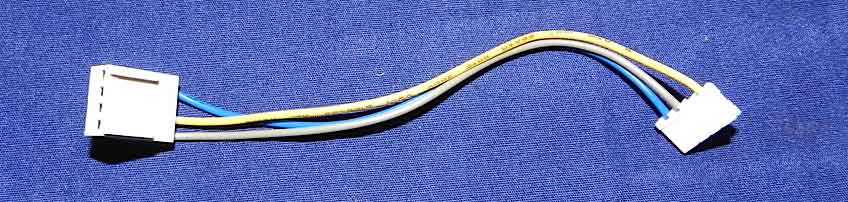
This cable will either plug directly into the original Innofader or plug into J40 on the VCA adapter for the Innofader Pro. Both models will work.
For reference below, here is the previous solution, but since we got so overwhelmed with requests, we are now supplying the plug-and-play solution above.
Thank you so much D-boy! You're the best. Here's instructions from D-boy on how to wire the Innofader to go into the DNX-1500S:
Hi all, this is the information for the jumper cable or adapter to fit a Innofader to a 1500s, instead of giving you a list of parts to purchase and build it from scratch (cutting, soldering, etc,) I?m sending you a much easier approach, using a MPC-2 CDROM cable (Black-to-White cable, Picture 2), but for reference I?m including the technical name of the connectors used.
Looking for the cable on your local computer shop:
For the mixer board YOU MUST use the JST Female connector (picture 1), any bigger connector will prevent the fader from fitting, the Black connector (picture 2) it will fit perfectly to the Innofader connector. Also you can use both JST Female connectors on both sides, I run into this type of cable in my shop and all I did was to remap the cables, meaning removing individually each connector or cable with a removing tool or in my case a thin but very strong radio shack scrapper (picture 3).
So, it all depends on what type of connector you run into, it could be a H4PL-to-JST or JST- to-JST (all female) or stick with the MPC-2 Black-to-White cable, you can find this type of cables in computer repair shops, most of the time for free. I also included a photo of the Innofader I use with my DN-X1500s plus connectors I already made.
Purchasing the cable:
You can find the cable just searching for MPC-2 Sound Blaster Cable, you will still need to remap the cable but do it only on the black connector as it is super easy to remove, you do not need the a removing tool, a needle will do, this ebay store has it for 1.79 free shipping
MPC-2 cable is available online here.
Cable mapping or color guide Flex Fader vs InnoFader
(Don?t forget it as you could damage your mixer)
ORIGINAL INNOFADER:
Red = Blue
White = Grey
Blue = Green
INNOFADER PRO:
Red = Pin 1 J40 (Pin 1 is pin closest to "J40" marker)
White = Pin 4 J40
Blue - Pin 2 J40
An easy way to see this will be to use the Flex Fader Female Connector and then simply replace the Flex Fader cables with the Innofader Cable, so for example:
The Blue Innofader Cable goes where the Red Flex Fader Cables goes in the female connector
The Grey Innofader Cable goes where the White Flex Fader Cables goes in the female connector
The Green Innofader Cable goes where the Blue Flex Fader Cables goes in the female connector
So to save yourself the effort of hand-soldering the Innofader wires to the white female connector, use the adapter cable to route the Innofader cable to these wire positions.
Also you can check this info. on the denondj forums
http://www.denondjforums.com/forum/index.p...;rb_v=viewtopic
Hope this information helps you, let me know if you need something else.
http://www.batteryspace.com/ProductImages/...ectors/4704.jpg
Picture 1: The JST Female 4 Pin

MPC2 Soundblaster sound audio cards card 18 inch: 11A1-11418
Picture 2: MPC-2 Cable, also the black connector is known as a Black H4PL 4 Pin Female connector

4-Piece Solder/Desoldering Tool Set ***NOTE: You can also use the mini-screwdriver included with the Innofader to remove the cable wires from the connector. The below kit is optional.
Picture 3: soldering kit from radio shack, use the angled scrapper to remove each cable